
Player Decision Brief
Porthole - Local Port Sharing
Consider Porthole if you want to connect friends to a LAN-only game or self-hosted server without router work. It suits technically curious players who can identify the right local service and verify compatibility with their game.
Is Porthole - Local Port Sharing Right For You?
Best For
- ✓ Players hosting LAN-only games
- ✓ Friends connecting to self-hosted servers
- ✓ Minecraft and similar local server setups
- ✓ Users replacing a full virtual-LAN tool
Think Twice If
- ! Players looking for a standalone game
- ! Users who need a whole-network VPN
- ! Games that are incompatible with the required port setup
- ! Anyone expecting native online multiplayer to be added automatically
Before You Buy Porthole - Local Port Sharing
Confirm that the target game or service supports LAN or local hosting.
Check which TCP or UDP ports the game uses, or plan to use the built-in detection.
Make sure every participant can install Porthole and access Steam.
Review the supported operating systems and interface languages on the Steam page.
Look for recent compatibility and latency reports for your specific game.
Porthole - Local Port Sharing Fit Matrix
Coop
High
Solo
Low
Grind
Low
Story
Low
Performance risk
Low
Beginner friendly
Medium
What Players Say About Porthole - Local Port Sharing
Recurring player themes that may help you decide whether this game fits your taste.
Players Often Praise
- • Several reviewers describe Porthole as a simple alternative to Hamachi or Radmin for playing with friends.
- • Multiple reviews report successful use with Minecraft or other local multiplayer setups.
- • A recurring practical benefit is support for Linux alongside Windows.
Common Complaints
- • One review reports that the utility did not work with specific games, so compatibility should be checked rather than assumed.
Mixed Reactions
- • Reported results vary by game and setup, with positive experiences alongside at least one failed compatibility test.
Performance Notes
- • Some reviewers report good ping or no noticeable lag, but these results may depend on the game, route, and network setup.
Purchase Notes
- • The utility is presented as free to use.
Player Fit
- • The strongest fit is for players trying to connect friends to LAN-only games or self-hosted services.
- • It is less suitable for anyone expecting a complete VPN or guaranteed compatibility with every local multiplayer game.
Porthole - Local Port Sharing Key Features
LAN games over the internet
Porthole lets friends connect to local-multiplayer and LAN-only games as if they were on the host's local network.
TCP and UDP support
Porthole - Local Port Sharing works with both TCP and UDP servers, covering common game servers and other local network services.
No router configuration
Porthole shares selected ports without requiring port forwarding, a public IP address, or manual router setup, including behind NAT and CGNAT.
Port detection
The utility can detect ports used by a running game or application, reducing the need to look up networking details manually.
Controlled friend access
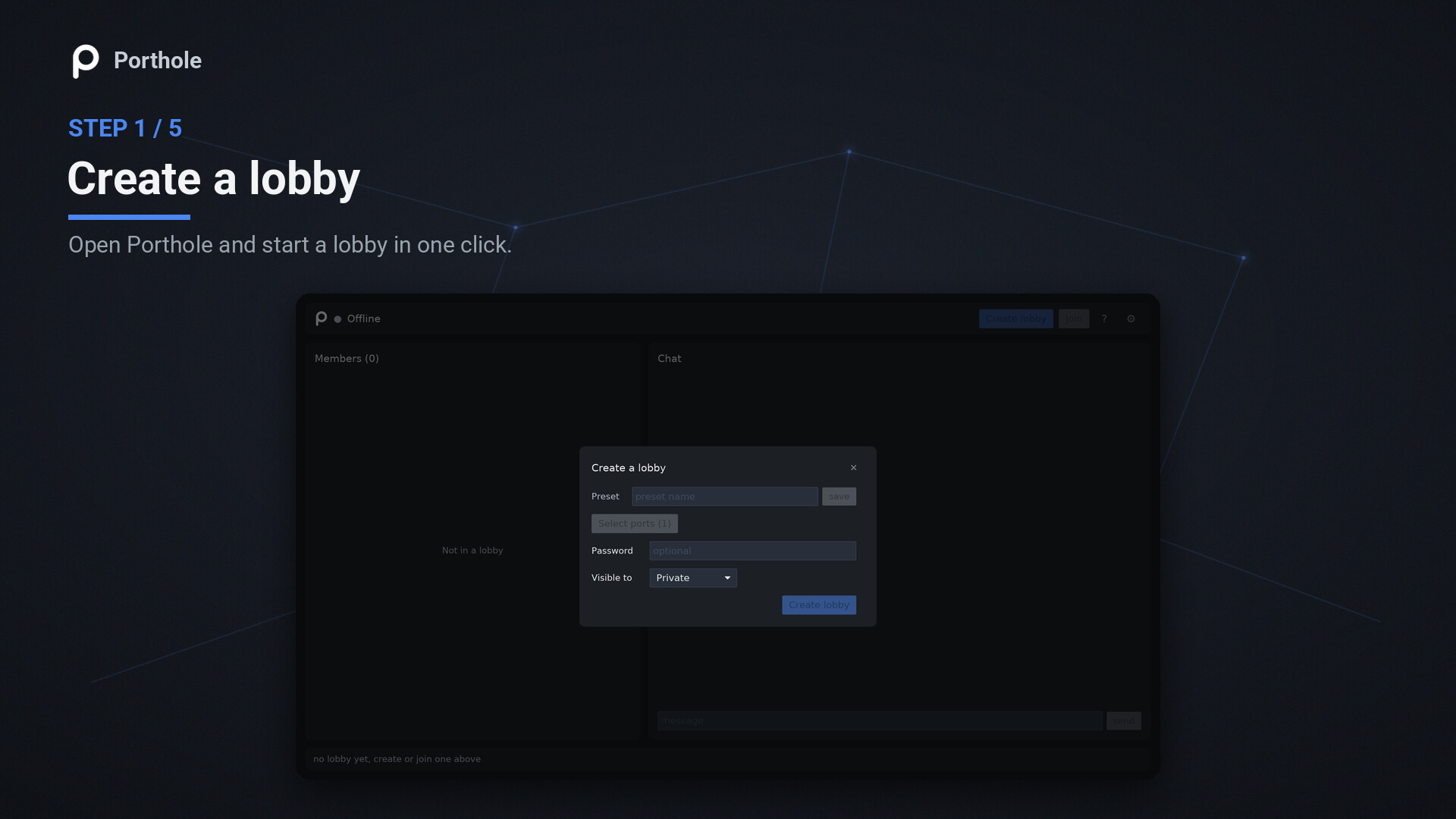
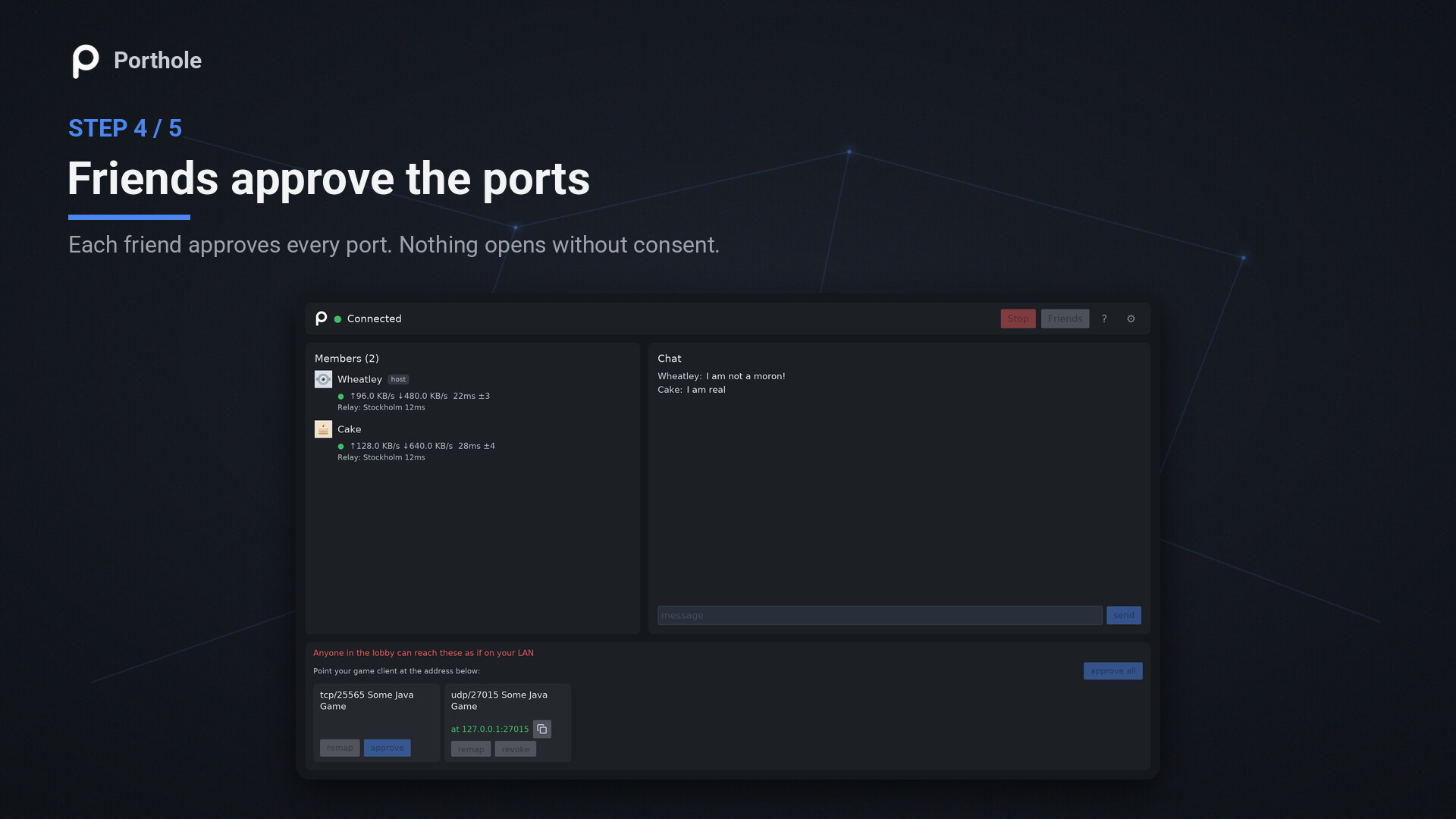
Hosts can use share codes or Steam friend invites, optional password-protected lobbies, per-port approval, and kick or ban controls.
Desktop and command-line tools
Porthole includes a native system-tray interface and a scriptable command-line interface, with support for Windows and Linux/SteamOS.
Porthole - Local Port Sharing Screenshots


Porthole - Local Port Sharing FAQ
What is Porthole - Local Port Sharing?
Porthole is a desktop proxy that shares selected local TCP or UDP ports with Steam friends. It is designed for LAN-only games, self-hosted servers, and other local services.
Is Porthole a VPN?
No. Porthole shares only the individual ports you choose rather than placing an entire machine or network on a virtual LAN. Guests approve each port before it binds locally.
Do friends need Porthole to join?
Yes. Friends need the utility to join a shared lobby, using a share code or the Steam friends list. The described joining flow does not require router configuration.
Which platforms and languages does Porthole support?
Porthole supports Windows and Linux/SteamOS. Its interface is available in English, French, Italian, German, Spanish, Arabic, Bulgarian, Czech, Danish, Dutch, Finnish, and Greek.
What should I check before using Porthole with a game?
Check whether the game or service uses TCP, UDP, or both, and identify the local ports it needs. Porthole can detect ports from a running application, but compatibility can still vary by game.
Porthole - Local Port Sharing Quick Facts
Genres
Tags
Check On Steam
Use this brief to decide whether Porthole - Local Port Sharing is worth a closer look, then confirm the details that can change or depend on your setup.
- • Latest system requirements for your PC
- • Interface, subtitle, and audio language support
- • Current price, discounts, release timing, and platform notes
Latest Games
MoreA quick way to spot a few of the newest releases worth browsing next.
Sins of a Solar Empire II: Harbinger
Recommendation Brief
More Games To Consider After Porthole - Local Port Sharing
These picks are ranked by similarity signals, freshness, and review strength, then presented with only the most useful non-repeating match cues.
Blasterbug: Last Bug Standing!
80 reviewsTry Blasterbug: Last Bug Standing! if you want a nearby take on co op and local multiplayer, with its own mix of scope and pacing.
WheelMates
320 reviewsTry WheelMates if you want a nearby take on online co op and co op, with its own mix of scope and pacing.
An Eggstremely Hard Game
86 reviewsTry An Eggstremely Hard Game if you want a nearby take on online co op and co op, with its own mix of scope and pacing.
I'm No Demonlord
120 reviewsTry I'm No Demonlord if you want a nearby take on online co op and co op, with its own mix of scope and pacing.
Rogue Point
900 reviewsTry Rogue Point if you want a nearby take on online co op and co op, with its own mix of scope and pacing.
Fireboy & Watergirl 1: The Forest Temple
211 reviewsTry Fireboy & Watergirl 1: The Forest Temple if you want a nearby take on co op and local multiplayer, with its own mix of scope and pacing.