
Player Decision Brief
Microsoft Flight Simulator (2020) 40th Anniversary Edition
Best for players who want a serious flight sim with strong aircraft variety, real weather, and room to learn. It is less suitable if you want quick sessions, minimal setup, or a low-complexity game.
Is Microsoft Flight Simulator (2020) 40th Anniversary Edition Right For You?
Best For
- ✓ players interested in realistic flying
- ✓ simulation fans who like detailed systems
- ✓ people who want VR or controller play
- ✓ players who enjoy aircraft variety and route planning
Think Twice If
- ! players looking for fast arcade action
- ! people who want a small install or light system load
- ! players who dislike learning complex controls
- ! users who need non-Windows support
Before You Buy Microsoft Flight Simulator (2020) 40th Anniversary Edition
Check that you are on Windows, since the game is listed for Windows only.
Expect a large install and enough storage space for the base game and updates.
Review the language list if you care about full voice support in your preferred language.
Look at the controller and VR notes if you plan to fly with a gamepad or headset.
Be aware that some extra content is available separately through in-app purchases.
Microsoft Flight Simulator (2020) 40th Anniversary Edition Fit Matrix
Coop
Medium
Solo
High
Grind
Medium
Story
Low
Performance risk
High
Beginner friendly
Medium
What Players Say About Microsoft Flight Simulator (2020) 40th Anniversary Edition
Recurring player themes that may help you decide whether this game fits your taste.
Players Often Praise
- • Players often praise the realism, aircraft handling, and visual presentation.
- • Many reviews describe the game as fun over long playtimes and note strong value for flight fans.
- • Several players mention that it works well with a controller or flight setup.
Common Complaints
- • Some players report long installs, update loops, or launch problems.
- • A few reviews point to a steep learning curve and occasional frustration with setup.
Mixed Reactions
- • Performance feedback is uneven, with some players saying it runs well on older hardware while others report lag or stability issues.
- • The install and update process is often mentioned as a tradeoff against the game itself.
- • Some players find the broader experience relaxing and open-ended, while others feel it is slow or boring.
Performance Notes
- • Reports mention heavy installation and update overhead.
- • Players describe mixed results on older hardware and occasional lag.
- • There are also comments about launch and streaming-related issues.
Purchase Notes
- • Several players mention that extra planes or add-on content can feel expensive.
- • Some reviews recommend waiting for a sale rather than buying at full price.
Player Fit
- • Strong fit for players who want realism and aircraft variety.
- • Good fit for people willing to spend time learning the systems.
- • Less appealing for players who want instant access and short sessions.
Microsoft Flight Simulator (2020) 40th Anniversary Edition Key Features
Wide aircraft selection
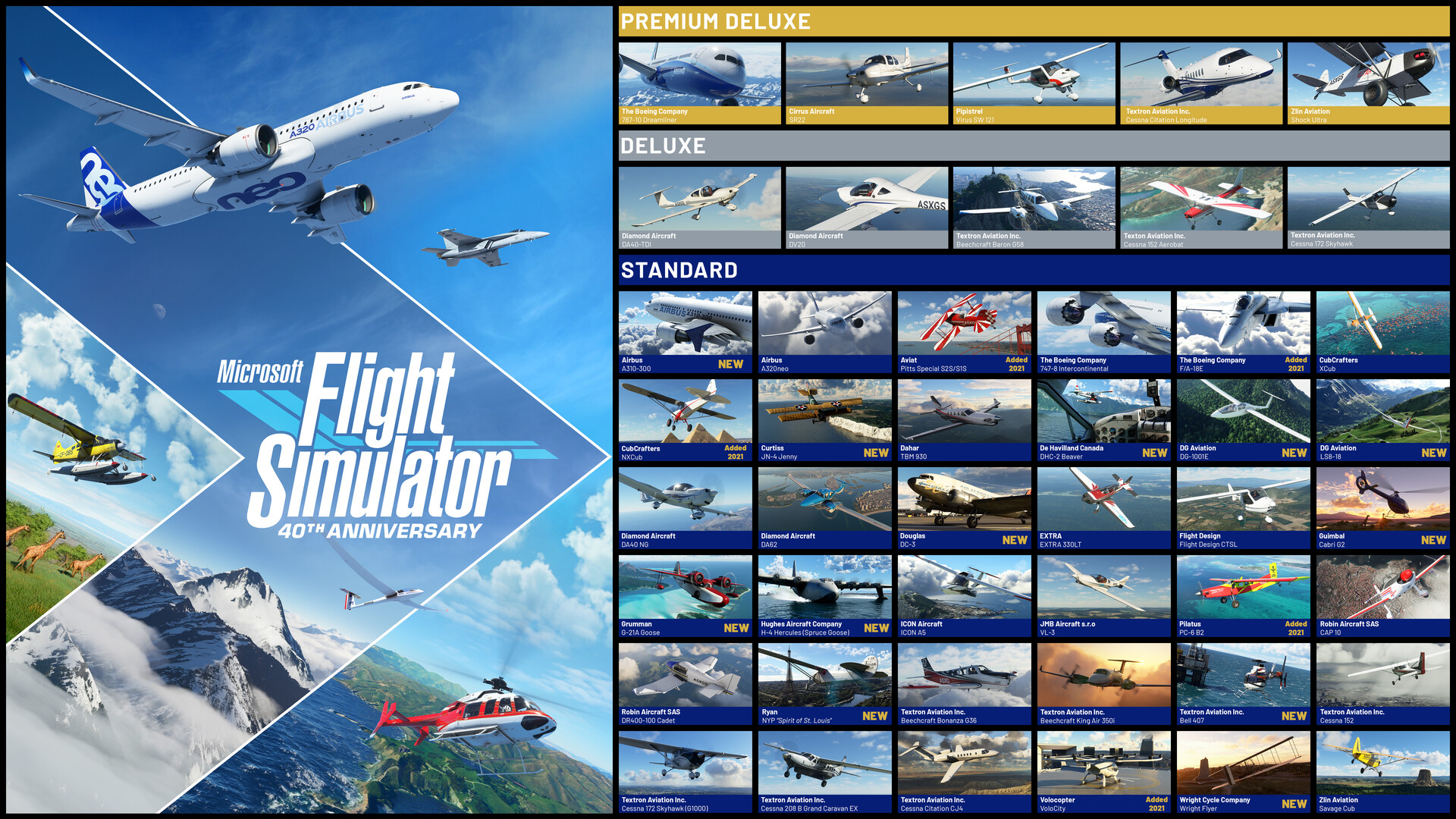
Microsoft Flight Simulator (2020) includes aircraft ranging from light planes to commercial jets, along with gliders and helicopters. The 40th Anniversary Edition also adds historical aircraft for players interested in a...
Detailed world recreation
The game builds its world from large-scale scenery data, with cities, roads, rivers, mountains, trees, and buildings represented across the map. That makes route planning and sightseeing part of the appeal.
Live weather and living world systems
Microsoft Flight Simulator (2020) can use real-time weather, live traffic, and animals in the world. These systems make flights feel more dynamic and tie the flight plan to current conditions.
Guided or manual flying
The checklist system lets players choose between fuller assistance and more hands-on control. Microsoft Flight Simulator (2020) is built so beginners can get oriented without locking out players who want stricter procedu...
VR, HDR, and controller support
Steam lists VR support, HDR availability, and full controller support. Those options make the game flexible for players who want to fly with a gamepad, headset, or a more immersive setup.
Classic aircraft, airports, and missions
The 40th Anniversary Edition adds classic commercial airports, helicopters, gliders, and franchise history missions on top of the base flight experience. Microsoft Flight Simulator (2020) gives series fans more to explor...
Microsoft Flight Simulator (2020) 40th Anniversary Edition Screenshots


Microsoft Flight Simulator (2020) 40th Anniversary Edition FAQ
What kind of game is Microsoft Flight Simulator (2020) 40th Anniversary Edition?
It is a simulation game focused on flying accurately modeled aircraft across a detailed world. Microsoft Flight Simulator (2020) combines flight training, navigation, weather, and aircraft variety rather than combat or mission-driven action.
Does Microsoft Flight Simulator (2020) support multiplayer?
Yes. Microsoft Flight Simulator (2020) includes both single-player and multiplayer options, so you can fly alone or with other players.
What platforms does it run on?
The game is listed for Windows only. It also offers full controller support and VR support, so players can verify those options before buying.
What languages are available?
English, French, German, and Portuguese-Brazil include full audio, while several other supported languages include interface and subtitle support. Checking the language list is worthwhile if you want voice support in your preferred language.
What should I know before buying on Steam?
This is a large simulation with a substantial storage footprint and a learning curve that can be eased by checklist guidance and assist settings. It also includes in-app purchases, so players should expect extra content options beyond the base package.
Microsoft Flight Simulator (2020) 40th Anniversary Edition Quick Facts
Genres
Tags
Check On Steam
Use this brief to decide whether Microsoft Flight Simulator (2020) 40th Anniversary Edition is worth a closer look, then confirm the details that can change or depend on your setup.
- • Latest system requirements for your PC
- • Interface, subtitle, and audio language support
- • Current price, discounts, release timing, and platform notes
Latest Games
MoreA quick way to spot a few of the newest releases worth browsing next.
My Beautiful Faraway, Please Don't Be Cruel To Me
Recommendation Brief
More Games To Consider After Microsoft Flight Simulator (2020) 40th Anniversary Edition
These picks are ranked by similarity signals, freshness, and review strength, then presented with only the most useful non-repeating match cues.
Planet Coaster 2: Parades Pack
38 reviewsTry Planet Coaster 2: Parades Pack if you want a nearby take on realistic and multiplayer, with its own mix of scope and pacing.
b 2
291 reviewsTry b 2 if you want a nearby take on open world and multiplayer, with its own mix of scope and pacing.
Korea. IL-2 Series
285 reviewsTry Korea. IL-2 Series if you want a nearby take on flight and realistic, with its own mix of scope and pacing.
日本事故物件監視協会3 -Japan Stigmatized Property-
53 reviewsTry 日本事故物件監視協会3 -Japan Stigmatized Property- if you want a nearby take on realistic and multiplayer, with its own mix of scope and pacing.
Minibus Simulator
110 reviewsTry Minibus Simulator if you want a nearby take on realistic and open world, with its own mix of scope and pacing.
EA SPORTS FC™ 27
1850 reviewsTry EA SPORTS FC™ 27 if you want a nearby take on realistic and open world, with its own mix of scope and pacing.